For builders and renovators
Millo makes job money obvious.
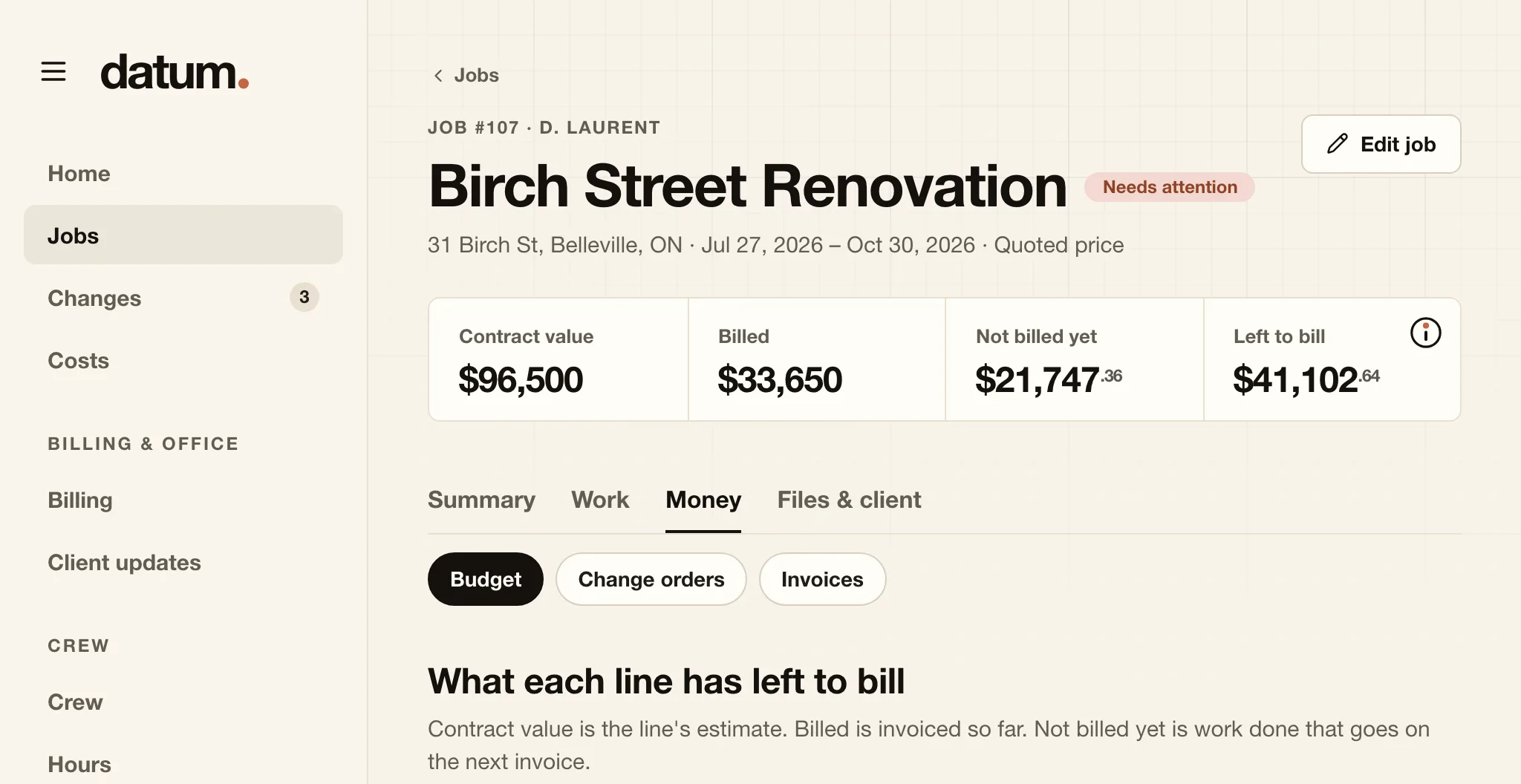
Each job's contract value, what's been billed, the work that's done but not billed yet, and what's left to bill, and which job needs a look before the next invoice goes out. It runs on your own computer, and you pay once.
- One payment
- Unlimited logins
- For Mac · Windows and Linux coming soon
Left to bill on Birch Street Renovation
$41,102.64
After what's billed and what's not billed yet.
- Contract value$96,500.00
- Billed$33,650.00
- Not billed yet$21,747.36
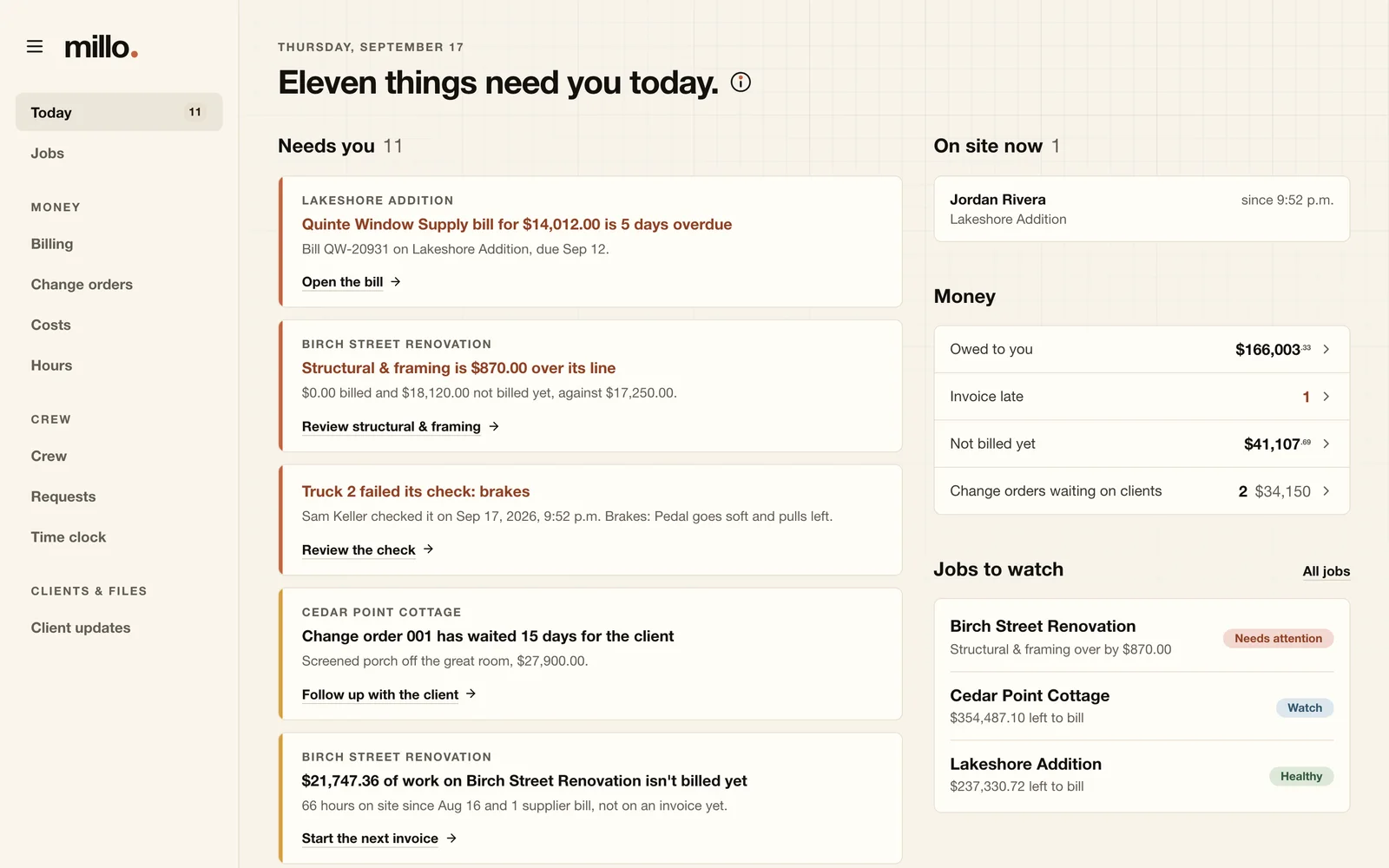
Structural & framing is $870.00 over its line.
The four numbers
Every job, in four numbers you already use
No variance reports to decode. Millo works out each job's money from the hours your crew log, the bills you enter and the invoices you send, and shows it the way you'd say it out loud.
Contract value
$96,500.00
The budget lines, plus every change order the client approved.
Billed
$33,650.00
What's been billed to the client so far, before tax.
Not billed yet
$21,747.36
Work that's done but not billed yet: hours since the last invoice, and supplier bills that came in after it.
Left to bill
$41,102.64
The contract value, less what's billed and not billed yet. Below zero, it turns clay.
Contract value minus billed minus not billed yet equals left to bill. On every job, and on every budget line.
Needs attention
The trouble, before it's a surprise
Each job gets one of four statuses, with the rule that set it. Anything that needs you lands on one list, with the money, the reason and the next step.
- HealthyMore than a quarter of the contract value is left to bill, and no line is over.
- WatchLess than a quarter is left to bill, or a change order has sat with the client for over a week.
- Getting tightLess than a tenth of the contract value is left to bill.
- Needs attentionA budget line is over, or the job is.
-
Birch Street Renovation
Structural & framing is $870.00 over its line
$18,120.00 of steel and LVLs not billed yet, against a $17,250.00 line.
Review structural & framing -
Lakeshore Addition
Quinte Window Supply bill for $14,012.00 is 4 days overdue
Bill QW-20931, due September 12.
Open the bill -
Cedar Point Cottage
Change order 001 has waited 14 days for the client
Screened porch off the great room, $27,900.00.
Follow up with the client -
Birch Street Renovation
Invoice 1036 is 40 days old and $10,237.80 is unpaid
Sent August 7.
Follow up on payment
How it works
From the job site to the client
Millo started inside a custom-home building company, as the replacement for the spreadsheets, group texts and paper timesheets it ran its own jobs on.
-
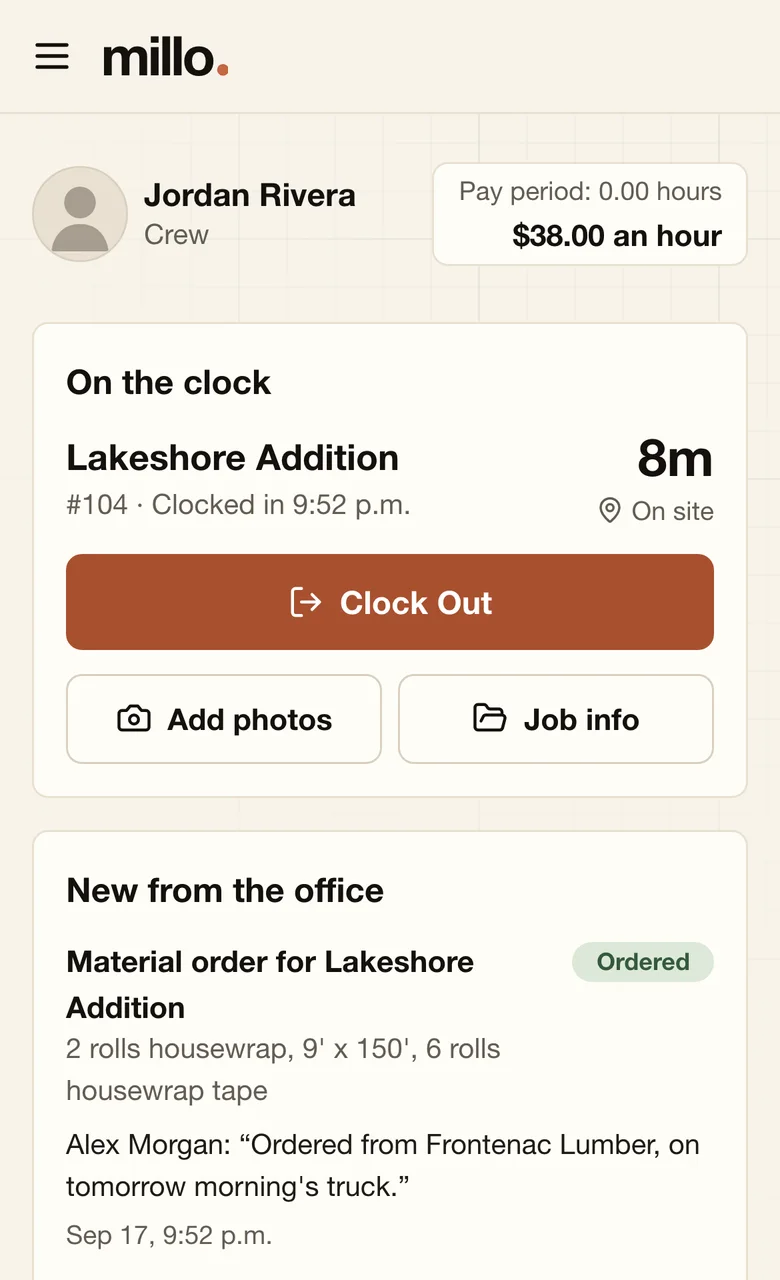
1On site
Crew clock in on their phones
Each person picks the job, clocks in and out, and adds notes and photos as they go. The unpaid meal break comes off by your own rule, and time off is asked for on the same screen.
- Works in the phone's browser, nothing to install
- See who's on which job right now
- Past shifts and pay-period totals for each person
-
2In the office
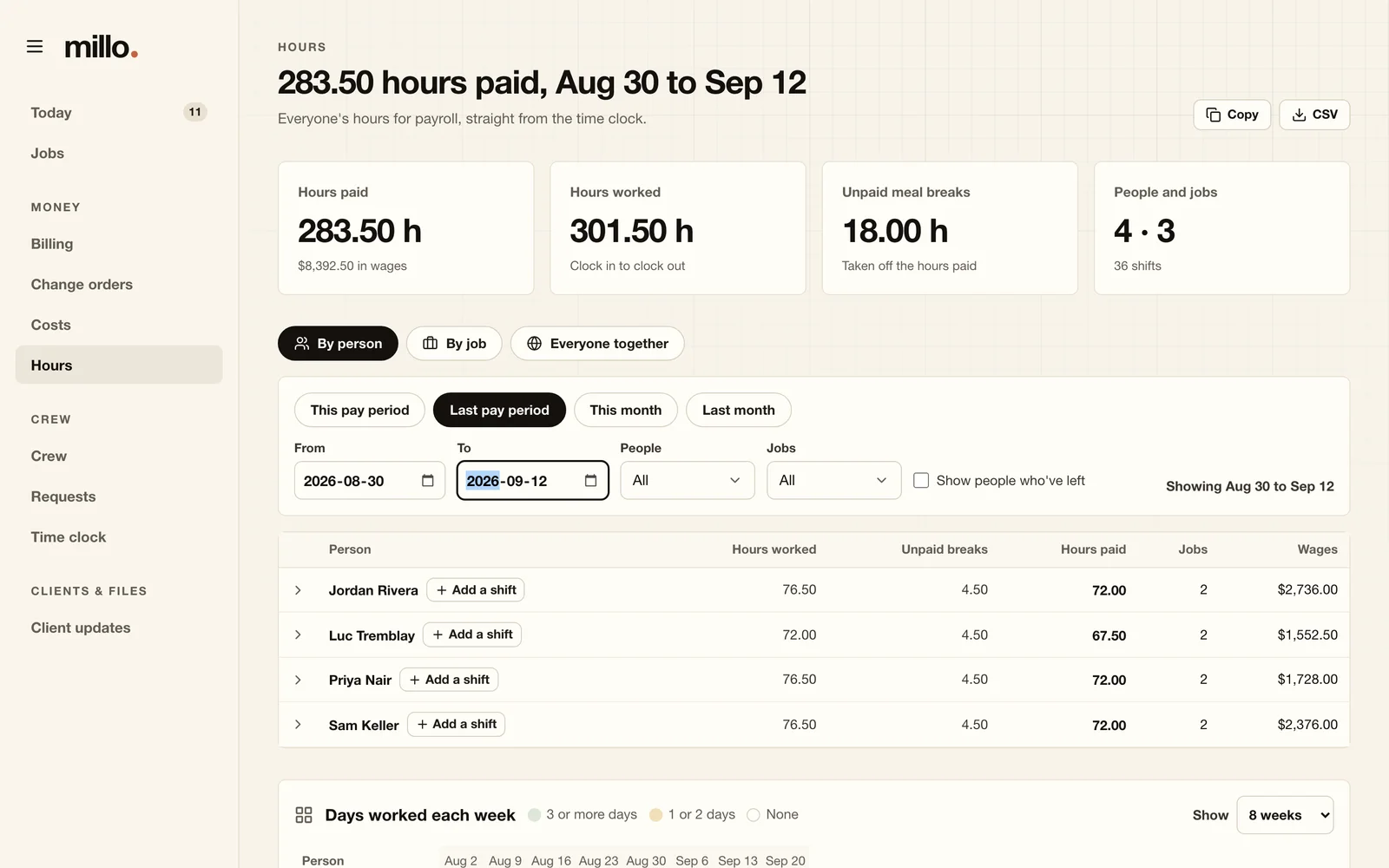
Hours land on the job, ready for payroll
Every shift is on its job the moment it ends. Hours shows gross hours, unpaid breaks, net paid hours and wages for any pay period, by person or by job, ready to copy or export.
- Missed a clock-out? Fix it from the office, with a reason on record
- The assistant sorts each shift onto the job's budget lines for you to approve
- A shift left open too long shows up under Needs attention
-
3Billing
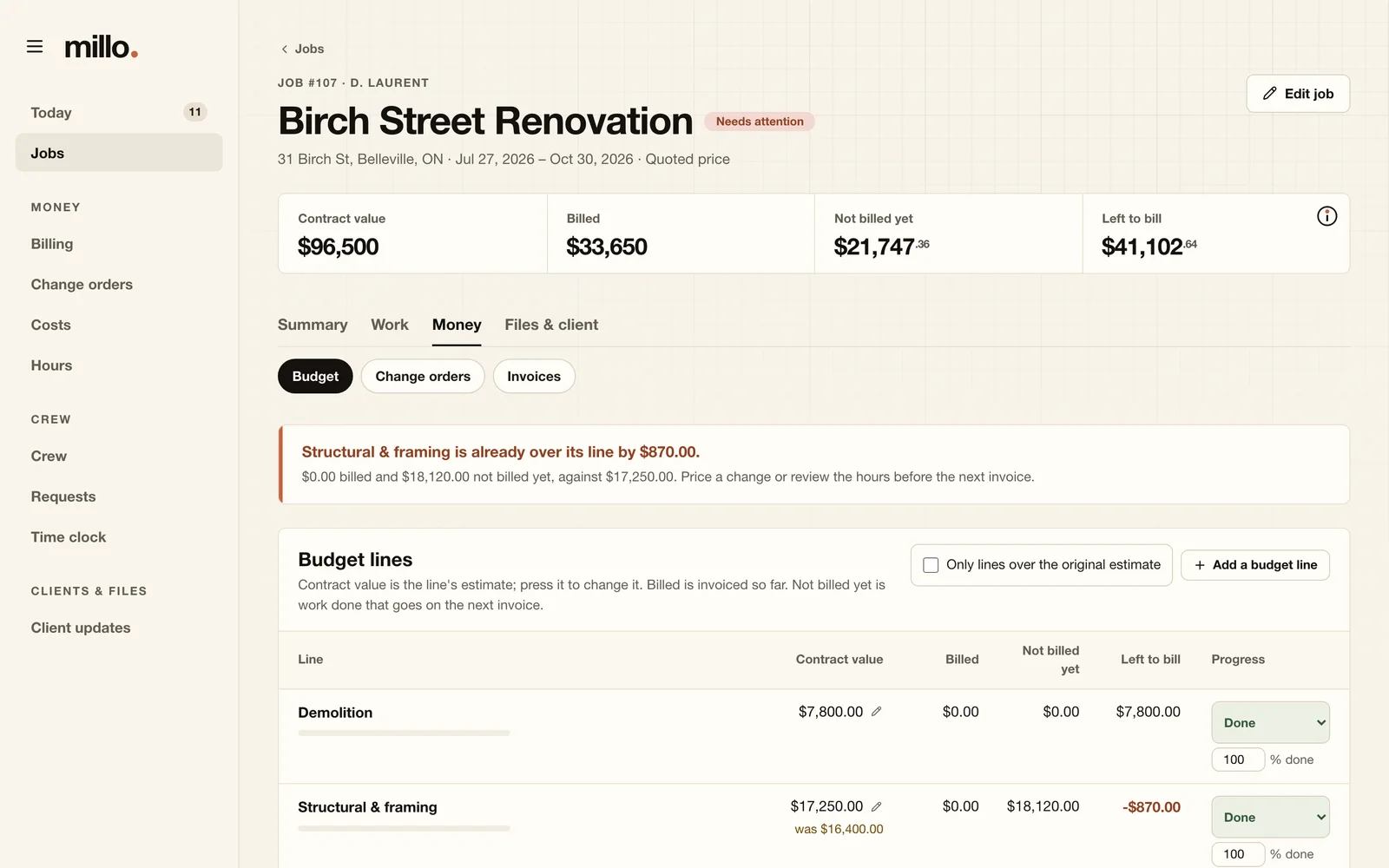
Every line shows what's left to bill
Each job's budget runs line by line: its contract value, what's billed, what's not billed yet and what's left to bill. Invoices split labour, materials, subs and general conditions, apply your sales tax and deposits, and are never deleted: a mistake is voided, and the record stays.
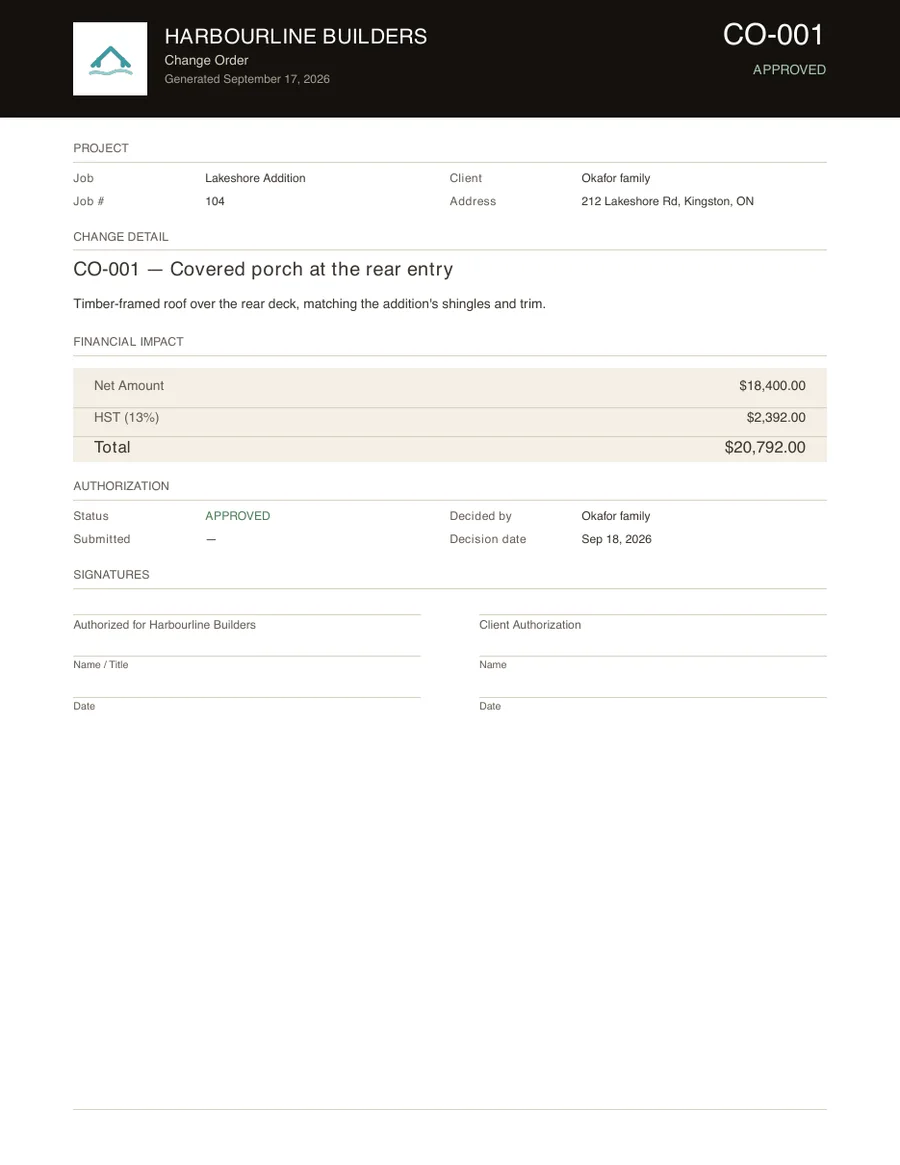
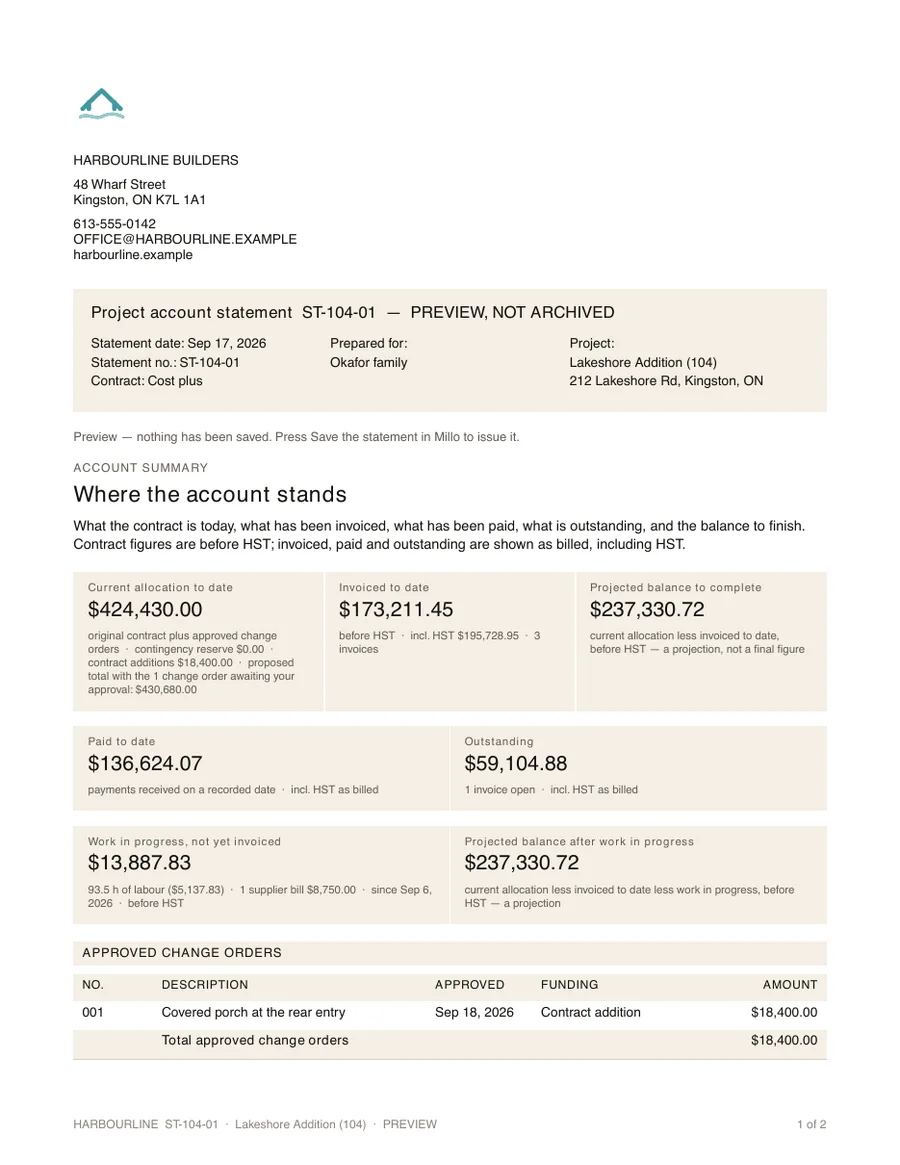
- Numbered change orders; approve one and the contract value follows
- Supplier and trade bills, with what's due this week
- Figures laid out for your accounting software
-
4The client
Paperwork with your name on it
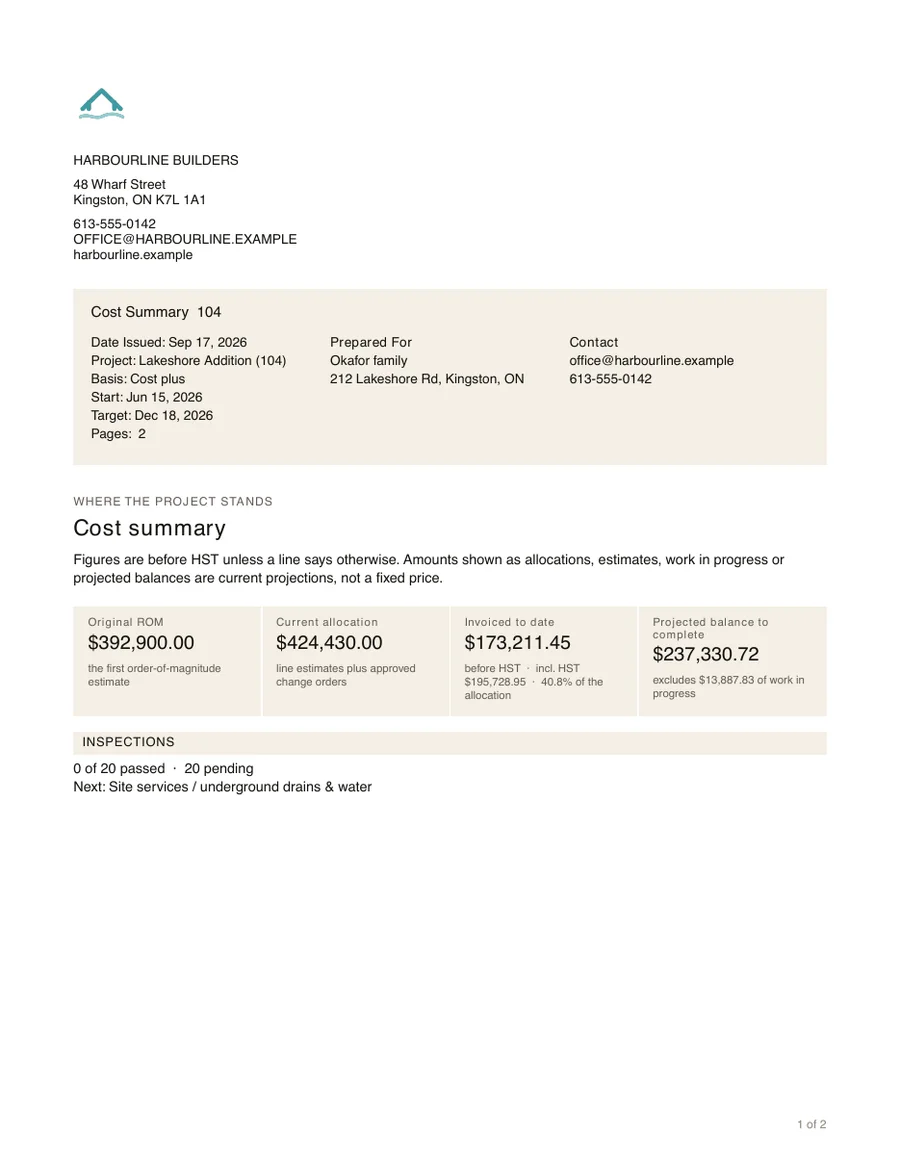
Cost summaries, account statements, change orders and hourly breakdowns come out as PDFs with your logo, address and contact details. Two-week client updates are drafted from the crew's notes for you to approve.
Millo drafts. You send, from your own email, when you're ready. Nothing goes to a client on its own.
Screens show a sample company and invented figures.
Everything included
One program for the whole office
Jobs and money
- Contract value, billed, not billed yet and left to bill on every job and line
- A status for every job, with the rule behind it
- One list of what needs attention
- The original estimate kept beside today's
- Bids tracked until they're won
- A checklist to get each new job ready, and one before you close it
Crew and time
- Clock in and out from any phone
- Notes and photos on every shift
- Your meal-break rule, applied for you
- Time-off requests and approvals
- Payroll hours: gross, breaks, net and wages
- Training and certificates on each person
- Starting and leaving checklists, from paperwork to keys
Billing
- Labour, materials, subs and general conditions on every invoice
- Your sales tax, deposits and credits applied
- Hourly breakdowns cleaned up for the client
- What's owed to you, and for how long
- Invoices voided, never deleted
Changes and clients
- Every change order on every job, in one place
- Numbered change orders with a signature page
- Approve one and the contract value follows
- Cost summaries and account statements
- Two-week client updates drafted for you
Costs
- Labour and supplier bills, job by job
- Bills due this week, and bills overdue
- Bills sorted onto the job's budget lines
- In Ontario, the Construction Act's payment deadlines worked out for each bill
The office
- A backup every night, to a drive you choose
- Forgot the owner PIN? Reset it at the office computer
- Owner, office and crew sign-ins
- Every change logged with who and why
- Documents keep every earlier version
- A setup list on Home that shows what's left to do
- Your logo, details and colours throughout
Yours, not rented
Software you own, on a computer you own
Millo runs on one computer in your office, and everyone else uses it from a browser. There's no account with us, nothing to renew, and no server of ours holding your jobs.
| Question | Subscription job software | Millo |
|---|---|---|
| What you pay | Every month, usually per user | Once |
| Where your records live | On the vendor's servers | In a folder on your computer |
| If you stop paying | You lose access | There's nothing to stop paying |
| When the internet drops | Work waits for the connection | The office keeps working |
| Backups | Theirs, on their schedule | Every night, to a drive you choose |
| Adding a crew member | The bill goes up | Add as many logins as you need |
The assistant
An assistant that works on your computer
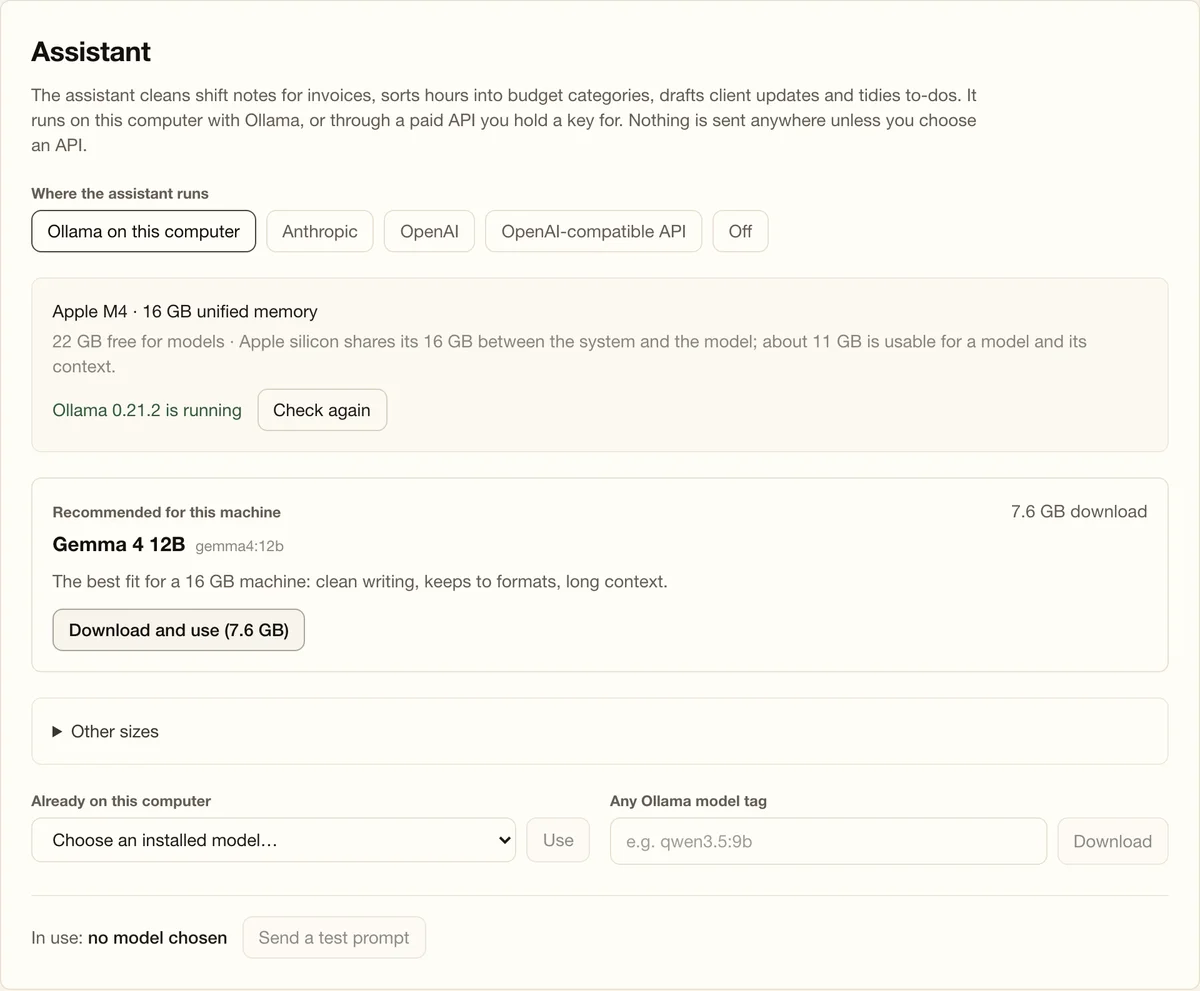
Millo includes an AI assistant for the writing and sorting nobody enjoys:
- Cleans crew notes into client-ready wording for the hourly breakdown
- Sorts each shift onto the job's budget lines for you to approve
- Drafts two-week project updates for each client
- Turns rough to-dos into clear questions for the crew
It runs on your own computer with Ollama, which is free. Millo reads your machine, recommends a model that fits (16 GB of memory is plenty) and downloads it for you. Prefer a cloud model? Add your own Anthropic, OpenAI or compatible API key instead; those requests go to that provider and are billed by them.
The assistant never sends anything to a client, and you can switch it off without losing anything else.
Your company
Your name on every page
Upload your logo and enter your company details once. They print on every PDF, and they're the icon your crew add to their phones' home screens. Pick one of five palettes for the app.
Working outside Ontario? Tell Millo where you work, set your own sales tax and meal break, and the Ontario-only tools step aside.
Getting started
Three steps to your first job
-
Download and open
One folder on your Mac. Double-click Millo and it opens in your browser. Another double-click makes it start with the computer. Windows and Linux are coming soon.
-
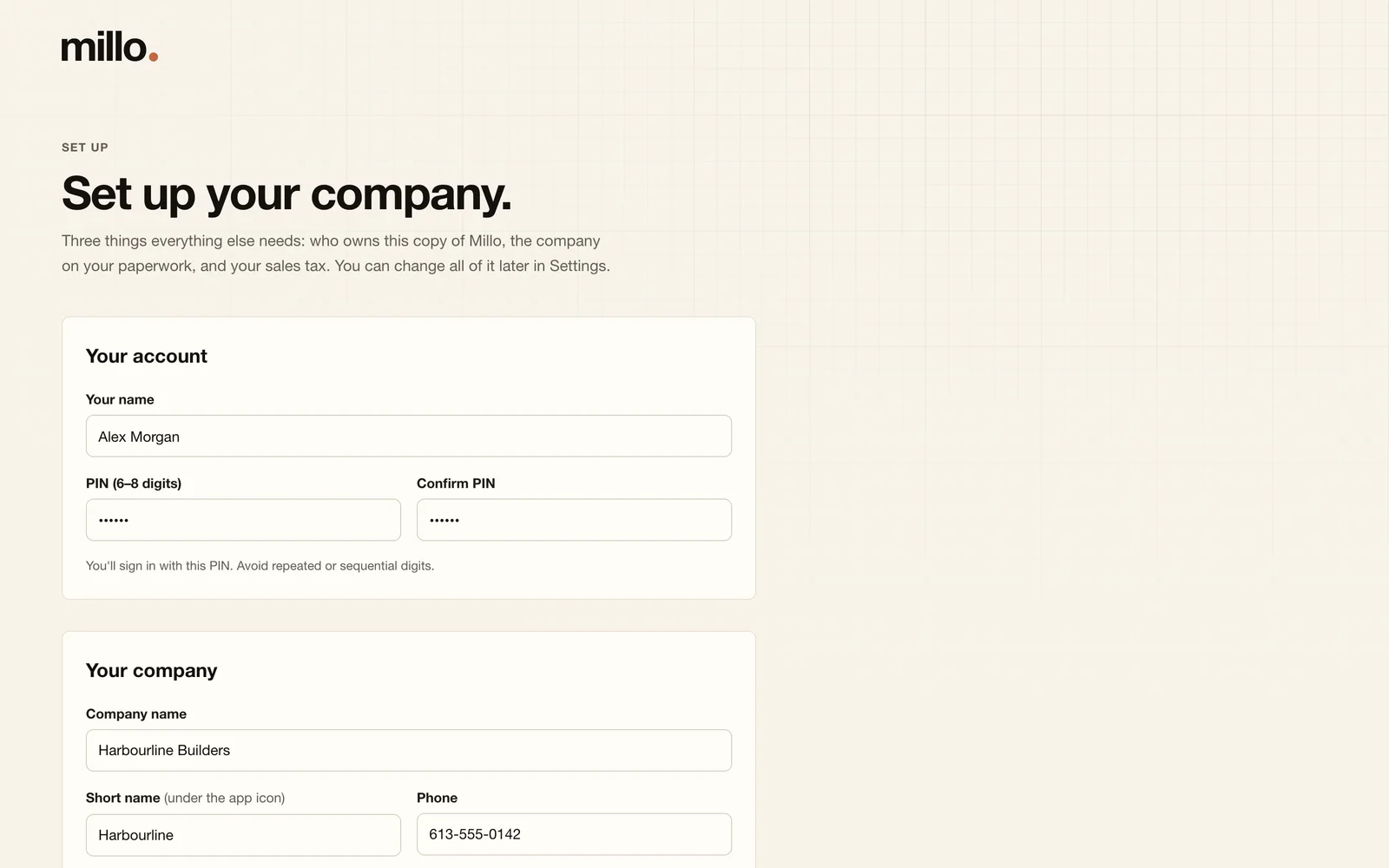
Set up your company
Your sign-in, your company's details and your sales tax. Home then lists what's left to set up, and where to do it.
-
Add your crew and a job
Give each person a sign-in with a starting PIN. They scan the code in Settings, then Phones, open Millo on their phone and pick their own PIN.
What you need
System requirements
| The computer that runs Millo | A Mac with macOS 13 or newer. A desktop that stays on is ideal. Windows and Linux are coming soon. |
|---|---|
| Memory | 8 GB runs Millo. 16 GB to run the assistant on the same computer. |
| Disk space | About 1 GB for Millo and your records, plus 3 to 25 GB if you download an assistant model. Backups go wherever you point them. |
| Phones and other computers | Any current web browser on your office network, or anywhere with Millo Hub. |
| The assistant (optional) | Ollama, free, on macOS 14 or newer. Or your own API key. |
Straight up
No sales calls. No demo requests. No catch.
See all of Millo right here, and buy it without talking to anyone. It's how we'd want to buy software ourselves.
-
Nothing gated
No sign-up to look around, no email wall, no "book a demo". Every page is open.
-
The price is on the page
US$450, once, for the whole company. No per-user fees, no subscription, nothing to cancel.
-
Nobody will chase you
We don't ask for your phone number, and there are no sales emails or follow-up calls. The only email you get from buying is Paddle's receipt.
-
Try it first
The demo is the real app with a made-up company in it. No form to fill in, nothing to install, and nothing you do is saved.
Pricing
Pay once. Keep it.
One price for the whole company. No monthly bill, no per-user fees, no account with us.
Millo
US$450
One payment. No subscription.
- Every feature
- Unlimited owner, office and crew sign-ins
- For Mac · Windows and Linux coming soon
- The built-in assistant, or your own API key
- Your records, and their backups, on your own drives
Questions
Questions builders ask
Is there really no subscription?
Yes. You pay once. There's no monthly bill and no charge per user. The only ongoing cost you might choose is a paid AI service, if you use your own API key instead of the free built-in option.
What do contract value, billed, not billed yet and left to bill mean?
Contract value is the job's budget lines plus the change orders the client approved. Billed is what's been invoiced to the client, before tax. Not billed yet is work done but not on an invoice: hours since the last invoice at the rate you last billed, and approved supplier bills that came in after it, with your markup on cost-plus jobs. Left to bill is the contract value less what's billed and not billed yet.
Where do my records live?
In one folder on the computer that runs Millo: Application Support/Millo in your Mac's Library. Nothing is sent to us, and we never see your jobs, your numbers or your clients.
What if the computer running Millo dies?
Millo backs up every night, by itself: the records, the files and the settings, to a folder you choose. Point it at a USB drive or a network drive and a dead computer costs you a day, not your records.
To recover, install Millo on the new computer, copy the latest backup into its records folder, and open Millo. Settings, then Backups, walks you through it.
What if I forget my PIN?
The owner can set a new owner PIN from the computer that runs Millo: open the Millo folder and double-click Reset owner PIN. The owner resets anyone else's PIN from Crew, then Sign-in accounts.
Does it need the internet?
No. Millo runs on your computer and your office network. You need a connection to download Millo and an assistant model. After that, only a cloud AI key uses the internet, and Millo Hub if you turn it on for phones on job sites.
How do my crew use it?
On their phones, in the browser: clock in and out, pick the job, add notes and photos, ask for time off and look back at their shifts. On your office Wi-Fi it works straight away. For job sites, turn on Millo Hub: phones reach Millo at your own web address, carried by a free Cloudflare account, and each phone is paired once so no one else can sign in.
What is Millo Link?
Coming soon. Millo Link connects your crew's phones to Millo from anywhere, with nothing to set up: no domain, no Cloudflare account. The connection is sealed from the phone to your computer, so nothing in between can read it. It will be a yearly subscription per company, with no charge per person.
Will Millo email my clients?
No. Millo drafts invoices, statements, change orders and updates. You read them and send them from your own email when you're ready.
Does it replace my accounting software?
No. Millo runs your jobs, hours, budgets and billing. When an invoice is ready, it lays out the figures to enter in your accounting software.
Does it work outside Ontario?
Yes. You set your own sales tax name and rate, and your own unpaid meal break. Tell Millo you work outside Ontario and the Ontario-only tools, like Employment Standards holiday pay and the Construction Act's payment deadlines, are hidden.
How do updates work?
Download the new version and open it. Your records stay where they are, and Millo brings its database up to date on the first start, saving a copy first.
Your jobs. Your numbers. Your computer.
One payment, and Millo is yours.